Saturday, 22 December 2012


This is a tutorial to add Facebook Like Button to your Blogger posts.
This is my second tutorial for adding Facebook Like button. If the other tutorial did not work for you then this is your solution. Because, if you are using a customized template or if you have made some customizations to your blog, you can see more than two of this code;

<data:post.body/> which you need for the first tutorial

Like my blog which has 4. So we need to look for another code*;

<div class='post-header-line-1'/>

And right after paste this code:

<b:if cond='data:blog.pageType == &quot;item&quot;'>
<iframe allowTransparency='true' expr:src='&quot;http://www.facebook.com/plugins/like.php?href=&quot; + data:post.url + &quot;&amp;layout=standard&amp;show_faces=false&amp;width=100&amp;action=like&amp;font=arial&amp;colorscheme=light&quot;' frameborder='0' scrolling='no' style='border:none; overflow:hidden; width:450px; height:40px;'/>
</b:if>


*Where you will look for the code that you will paste green code after?
  • Log into your blogger account
  • Go to Layout --> Edit Html.
  • Check Expand Widget Templates box.
  • Press Ctrl + F and then type <div class='post-header-line-1'/> into the box.

That's all! This is how I added it to my blog. Now your readers are free to like and share your blog entries on their Facebook Timelines with your new button!

Thursday, 20 December 2012

Today I want to introduce you my Website kitchen with the greatest tolls: www.Wallwisher.com

What is Wallwisher?

"We give you a blank page (a wall).
You put anything you want on it, anywhere.
Simple, yet powerful!" with their own words.

And these are the things you can do on your wall.


I use wallwisher as an online notebook. With just a double click you have a post it and you can embed a website or link into it. You can change the size of the notes. When you embed a video, it is like your personal TV and when you add links of the webpages you read, it becomes your RSS reader or newspaper Iwould call it.
I am a language lover. First I started to use this website just to write the new words I learned to memorize them. Then one day I tried to translate a short text and pasted the test there. While trying to translate it for the future study purposes, I started to add small notes as dictionary around the text, then I added a video link from youtube to listen. And finally it really felt like my study desk.
Then I started to use it to take notes for the questions of my students, so I could answer them all without forgetting. And whenever I see some related information with those questions, I just edited the old note  and added the new helper text inside it

What's more?
  • You can allow others to add notes! Directly or through moderation.
  • You can let people just to view it, make it completely private!
  • Who can read? Who can write? Moderate posts? Just answer them as you like.

Imagine a teacher, isn't it great to have questions on an online blackboard?
or before a group/association meeting, let everyone to write what they want to discuss next meeting!
  • You can make it your guestbook!

Creativity has no end.
There are some people that use it as a personal Webpage, too. There is no navigation bar but you can give links of your different walls and use them like menu if you like.There is no monetization but maybe you could embed your website link that have ads, if you are really into it.. just an idea.
  • There  are nice wallpaper and customization options, you can also add your own photos.

Other Super Features
  • First of all you will save the trees and your time. 
  • You will have a RSS link so you or other people can follow the updates, in case you let people add notes, it will be inevitable to use I assume
  • You can embed your wall into your Website!
  • You can share any notes on variouss social networks!
  • You can mobilize it with a code and it is in your smart phone in a second!


Now I am leaving a sample page for you to see closer, or directly open wallwisher and start to save trees :)
They are also on Facebook


Saturday, 15 December 2012

Google Plus has a new feature now.


For someone, who has been confused with the circles a little bit, I call it a real solution. So I created one here, for Turkish Learners. https://plus.google.com/communities/110812863755267743355

You can create a community and invite the people who you have in your circles or you follow. Also you can set it to private and approve the people before they can join.

When you choose the option to create a new community, you can

  • give a name to your community
  • add a descriotion
  • add tags for people to reach easily
  • and add location information
1. When people navigate the community page, your profile photo will always appear as the owner and if you like to get known for some reasons (maybe you are an author or teacher), then you will like that.

2. You and the community members will be able to share posts, links and videos just like you share on your google plus profile page.

3. You can hang out with the community members.

This last feature is my favorite as I will be able to use it as a Turkish Classroom. This community feature is better than categorizing people into circles. Because people with the same interest will have a place to come together, and it will be easier to find and reach than your profile. Isn't it like an online college?

If we compare it with the Facebook Fan Pages; the hang out opportunity is the first thing that comes to my mind. 

Will Google Plus replace the Facebook, what do you think? Or what else do we need to migrate to Google? or do we?


Friday, 14 December 2012


I want to introduce you the most useful online file converter that I’ve ound so far.
www.online-convert.com

You just select your target format and upload your file and then you have your file to download in 1 minute!
You can also share the file on social sharing sites like Fcaebook, Twitter and on so many other platforms.
The website gives you a link to share your file or download it in 24 hours again. You can delete your file if you do not want to leave it in their database or they already delete it in 24 hours.
It is also possible to take your file directly to your smart phone with the code they generate or you.
I tried it for rom djvu to PDF and from PDF to epub and it was totally great quality.
Text, audio, video or ebook, you can convert any file on www.online-convert.com or free. If you like their work there is a donation button also.
Happy converting and sharing! ^^

You have a blog page on www.blogger.com / www.blogspot.com and you want to remove the Blogger Navbar which is on the upper side of your page and looking like this:


If you searched the web and saw that some web sites are giving tips about editing the template and removing  some coding lines;
That is totally unnecessary.
All you need to do is;
1) Log in to Blogger www.blogger.com/home  (Click this to open a new tab or window)
2) Choose your blog that you want to remove the Navbar from: click its title
3) From the left side menu bar choose layout
4) At the top-right you see the edit in the navbar box, scroll down and choose Off.
That’s it! ^^

Why to remove?

The first main two reasons are;
1) Your blog will look more professional
2) Navbar has a “Next” optiton that directs your reader to another random blog, so it will increase the possibility of losing your reader.
Are there any drawbacks?
1) Navbar has a search bar, when you remove the Navbar you should not forget to add a search bar to your blog.
2) There are millions of blog pages and it is real small possibility that someone will end up in your blog page by clicking next blog link on another blog but you can lose a potential reader. But this possibillity is already almost zero.
3) When you have Navbar on the page, evenwhile reading another blog, you can press Design and go to your blogger home page to edit your work. There are also New Post, Share and Google Plus short cuts on the Navbar.
I recommend you to remove and view your blog page without it, then the decision is yours.
Cheers! ^^

Gül Öztürk


I want to share a memory from university years with you and so you will get to know what this title stands for…
I studied Business Administration and Economics. But ask me if I really had fun in the name of learning? Maybe, History of Economics was fun I would say. 
Now I hear that some of you say  ”Girl, you should have chosen the major you would like to learn about then”
Not all the countries have a nice professor evaluating system. And my country was one of them. Even if the professors give F to whole class with a  big laugh on their face, there really is no punishment or some mechanism to stop them unfortunately. They are the only ones who read the evaluation forms, and if only they feel like. And I am not even talking about how someone can dare to write without having the fear of being recognized.  How nice it sounds, doesn’t it?
I remember that I was sitting and waiting for the  final exam paper of a computer programming class. While all the assistants were running around, our lovely professor came and said, “The papers are not enough, you need to wait a little bit more, we still copy them”
And he also added;
“Students always put the blame on professors. If they get A, they say ‘I got A’ but if they get F, ‘The professor gave me F’,
Ho ho did I really give F to this many people?”   …

The normal count is 110 and we were 377 people… And believe me there are more examples but just thinking maybe you have not entered to university yet, I am being nice and not sharing them :)
So, even if you have love for one particular subject, there are some soldiers of universe that serve for jobless society association that they want to see, as if there is not enough suffering people already…
And these people have enough power and equipment to destroy your will to learn.
Now I enjoy self-learning. This article was already going to about that but my memory pushed me to write about the importance of the evaluation system.
I would like hear your stories and opinions, too.
Hope you had nice time reading,
Cheers! ^^
Facebook Like button allows your visitors to share your blog posts with their friends. Blogger template already has a sharing set of icons but with this button they will be able to share with just one click.  And isn’t it nicer to see the word “like”?

Just to remind you; you can download your template as backup before you start or you can set your template to default settings to clean all your adjustments if something seems wrong after you paste the codes. But even if you don’t know about coding, it is so simple. You will just copy and paste some codes and I am here if you have any problem.
Here we go,
1) Log in to Blogger and from the dashboard, go to Template tab.
2) Click “Edit HTML” and check “Expand Widget Templates”.
3) Press CTRL + F and Find <data:post.body/> (you will see two of them, select the first one) add the below code after it.
  • If you want it to appear on all pages (posts, home page, static pages), then take the green text only,
  • if you don’t want it on static pages add the blue text to the green one
  • and if you want it just on posts  copy “green+pink codes”.
<b:if cond=’data:blog.pageType == &quot;item&quot;’>
<b:if cond=’data:blog.pageType != &quot;static_page&quot;’>
<div style=’float: none;’>
<iframe allowTransparency=’true’ expr:src=’&quot;http://www.facebook.com/plugins/like.php?href=&quot; + data:post.canonicalUrl + &quot;&amp;send=false&amp;layout=standard&amp;show_faces=false&amp;width=450&amp;action=like&amp;font=arial&amp;colorscheme=light&amp;height=35&quot;’ frameborder=’0′ scrolling=’no’ style=’border:none; overflow:hidden; width:450px; height:35px;’/>
</div>
</b:if>
</b:if>
4) Save your template.
Now you have an additional Facebook Like Button that people can use to show their love for your blogger posts!
Cheers! ^^

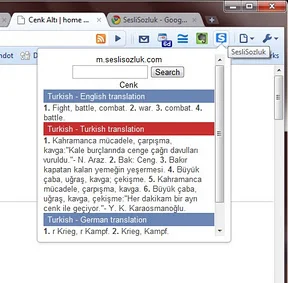
Here is the best dictionary extension for your browser ever!

Once you add  it to your google chrome browser, all you need to do is highlighting the word you want to translate and press S key, can you believe?
After I started to publish a simple Turkish Newspaper for language learners I was confused. I added google translate as a widget in the sidebar but I wanted to have a dictionary that does not lead the readers to another webpage. So Sesli Sözlük (Audio Dictionary) was the best solution ever!
And there is more..
If you click the dictionary icon and type the word instead of pressing S button, you have an option to hear the word also! And again without leaving the current browser!
The link I wrote before is set “from Turkish to English” dictionary. But you can select different languages by right clicking the small icon you see above and choosing options.
I haven’ tried it for the other languages yet. But I’m happy to find an alternative to google translate. I think it is better to be able to look up word by word if you are trying to learn  a language.
I hope you will also like it!
Cheers! ^^

Today I want to introduce you two extensions you should definitely add to your web browser if you are learning Swedish ^^
This extension displays a notification with a randomly selected Swedish word as the title along with an example sentence.
You can set the time 1,2,3,4,5,10,15,20,25 or 30 minutes.
And if you choose 5 minutes, every 5 minutes you will see a new Swedish sentence.
Clicking on the notification text will open a Google translate page showing a translation of the example sentence.
The notifications disappear automatically after 14 seconds and the flash cards are stored locally to enable offline study.
Swedish – English dictionary extension based on data from the People Dictionary
This extension was designed for Swedish/English language learner to be an online dictionary.
Useful features:
- Instant audio player: Normally, when click to play audio in People Dictionary, it is so annoy that it will open a new tap and you have to click the audio again. With this extension, you don’t !
- Translate in same page: You do not have to open the people dictionary in another page and type the words you are looking for. Just type ‘Ctrl+Q’ or click the extension icon.
Aren’t they just great?
Today I will share my ideas about “about.me” with you.

About.me is a  website where you can create a personal profile page. You can give a link from your Webpage or use it as a e-mail signature.
  •  It is completely free (except the business card feature)
  • So easy to use
  • Also, there is a help page that explains all the features very well.
  •  You can choose a background picture from the options or upload yours
  • You can upload a biography photo
  • You can change link, text and the title colors
  • You can change the fonts and they are quite different and look so nice
  • You can set Apps! You can add your Facebook, Twitter, Google+, WordPress, Blogger,Tumblr, Instagram and Linkedin Profiles and your visitors can just click the icons to se those pages
  • You can add any links or webpages you wan to show on your profile. Facebook Fan Pages, a specific link or whatever you like
  • You can add your location
  • And finally you can writ a biography
  • The visitors can share their opinions about your profile sending you an e-mail or they can favorite your page
  • You can get an e-mail address like “yourname@about.me” which I think it is awesome as it is so simple and easy to remember
I really like its look and feel and it is really great to have a nice looking place to introduce yourself and your work.
If they like your profile they can share it on their twitter page even!
I think it can be seen as a way to reach more people and if you have more than one webpage, it is great to have just one place to get feedback.
And finally this is my profile;
There is developer API for the web designers, so you can create a unique profile for yourself and share it here with us!
Cheers! ^^

Do you want to have a video showing your recent ten posts with voice over and a soundtrack? How can you turn your blog into a video with just one click? The answer is Wibbitz. This is a nice little tool that will help you to make a video from your blog posts and 100% free.

Visit the Wibbitz homepage, and look at the bottom. Fill out the email and site URL fields, and click on Create Your Clip. This might take a few minutes, since it involves a lot of processing. It can give this error “Timeout expired. The timeout period elapsed prior to obtaining a connection”, probably as their server is busy at that moment. And if you don’t write a URL that does not have feed, you can see this “invalid url”.

Once finished, you’ll get an embed code for your video. Also you can directly share it on Facebook and Twitter. If you don’t like the soundtrack,  you can use the Customize Clip option below and choose another from six different songs. You can re-size the video, put in a voice over, or put in Loop or Autoplay. After changing, don’t forget to update and get the new code.

If you have at least one picture in your each post, it will be a even nicer presentation video for you!

I’ve always been using hotmail. Because I was using messenger to connect with my friends. But nowadays whenever I try to log in it asks for my phone number saying “Only password is not enough” Is it really not enough? I think it should be the only thing I need. Now they say that we need to give a phone number, to make it more secure.I have been using yahoo in my school years but it is even worse! It asked me if I want to use my fingerprint ?! Seriously, can it go any further? It was only the police who took my fingerprints until today, as it is necessary if you want to get a passport. But for an e-mail account… Okay, it was not an obligation but just an offer.. but still I think it is quite unreasonable.

Now I’m using gmail. Why? Here it is:

10 GB Space
Multi Sign in – while being logged into one e-mail account you choose ‘add’ option and sign in for another gmail account, and it never forgets! Once after you add it, it is enough to click for once to access to your other gmail space
Useful for Google Chrome Users – as you directly gain access to various services like blogger, google plus, youtube
Youtube – you’re already having a gmail account when you create a youtube profile, so why not to keep using the current one then
Faster than the others - Google chrome is the fastest web browser, and gmail is the fastest e-mail service.
Organized – When you receive more than one e-mail from the same user, it collects them under one e-mail and you see them with just one click. Isn’t it practical?
Highly customizable – I selected the wood background, it feels like an office. But this is also possible;


These are the reasons that I can think of right now.

I would like to hear what you think also.

Have a nice day!